How to Set Up Multi-Location Utility Tracking: A Step-by-Step Guide for Property Managers
“Managing utilities across 10 properties shouldn't require 10 different spreadsheets.” If you’re a property manager, portfolio manager, or facilities operator, you already know the pain: different billing cycles, inconsistent meter labels, scattered files, and a constant feeling that you’re reacting instead of controlling.
This step-by-step guide shows how to set up multi-location utility tracking in a way that scales from 5 properties to 50+ without chaos. You’ll learn how to design a location hierarchy, standardize meter naming, implement consistent reading schedules, configure alerts, and build reporting that drives decisions—not just dashboards.
Key Takeaways
- Location-based organization is the foundation of portfolio utility management—without it, comparisons and alerts are unreliable.
- Standard naming conventions reduce errors and make reporting consistent across staff and vendors.
- A consistent reading cadence (weekly/bi-weekly/monthly) enables anomaly detection and faster leak discovery.
- Alerts should be configured to catch spikes, continuous usage, and missing readings—before month-end bill shock.
- With UtilityControl, you can manage multiple properties and meter types in one system—no special hardware required.
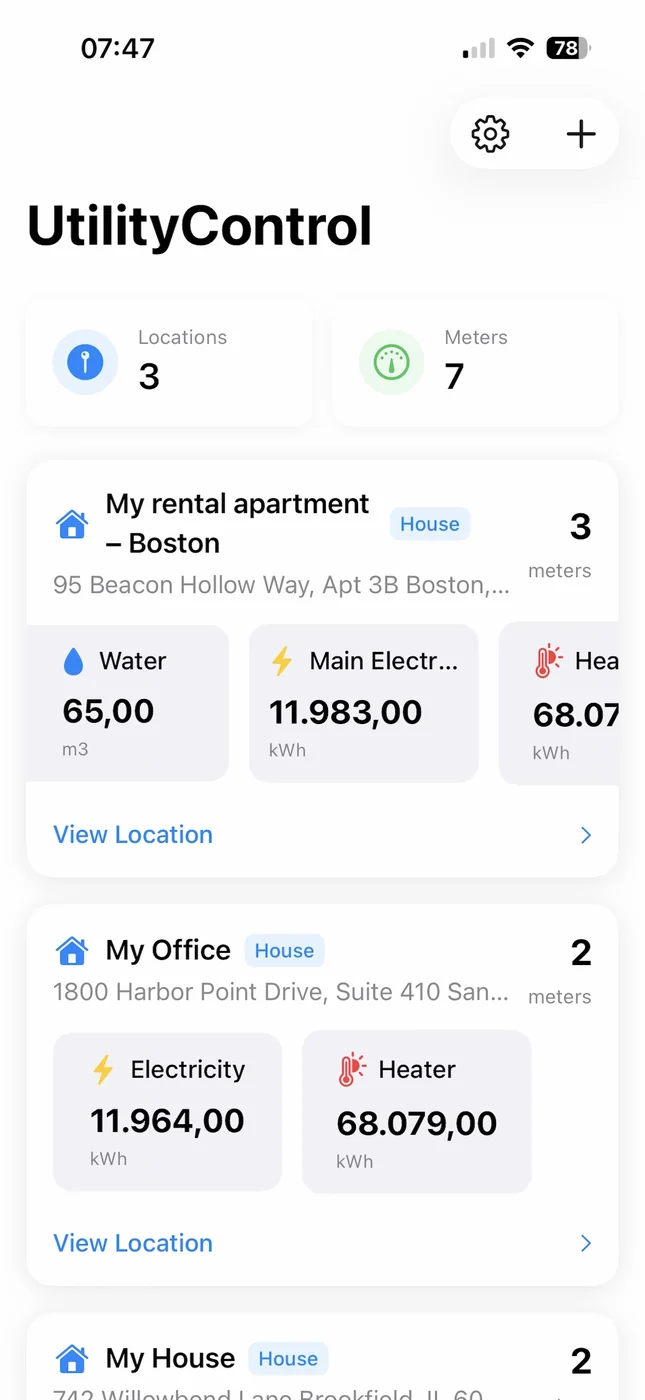
Every property gets its own card with its own meters — the dashboard view once your locations are set up.
Introduction: The challenges of multi-location utility management
Multi-site utility tracking fails for predictable reasons: each property has its own meter layout, utility providers, billing dates, and staff habits. Over time you end up with “one spreadsheet per building,” inconsistent meter IDs, and data that’s impossible to trust.
The operational cost is real: late anomaly detection (leaks and equipment failures), tenant disputes over usage allocation, and hours spent reconciling bills across locations. A scalable system needs three things: structure (location hierarchy), standards (naming + units + schedules), and automation (alerts + reporting + ingestion).
Why location-based organization matters
Location-based utility tracking means every reading, meter, and bill is anchored to a clear place in your portfolio. That’s what enables:
- Accurate comparisons: “Property A vs Property B” only works when meters are consistently mapped to locations.
- Reliable alerts: spike detection depends on baseline patterns per location.
- Portfolio reporting: you can roll up from meters → buildings → regions → portfolio.
If you’re planning to expand, treat the hierarchy as a data model decision, not a UI preference.
Step 1: Audit your current utility tracking system
Before migrating tools, take a one-hour audit. Your goal is to identify what you track today and where it breaks.
Inventory checklist
- Locations: list properties/buildings/units you manage.
- Meters: electricity, water, gas, heating (and any submeters).
- Units: kWh, m³, gallons, therms, etc. (note where units differ).
- Costs: do you track cost-per-unit and currency per meter?
- Cadence: how often do readings happen (and who owns it)?
- Gaps: missing readings, estimated bills, or unclear meter mapping.
Output of Step 1: a simple table of locations and meters that you can use as your migration blueprint.
Step 2: Organize properties by location hierarchy
A scalable hierarchy should answer: “Where does this meter belong in the portfolio?” A good default for property managers is:
- Portfolio (company)
- Region (optional: city/market)
- Property (building/community)
- Sub-location (unit/common area/mechanical room) when needed
Keep it as simple as possible. Too many levels create admin friction; too few levels prevent useful rollups.
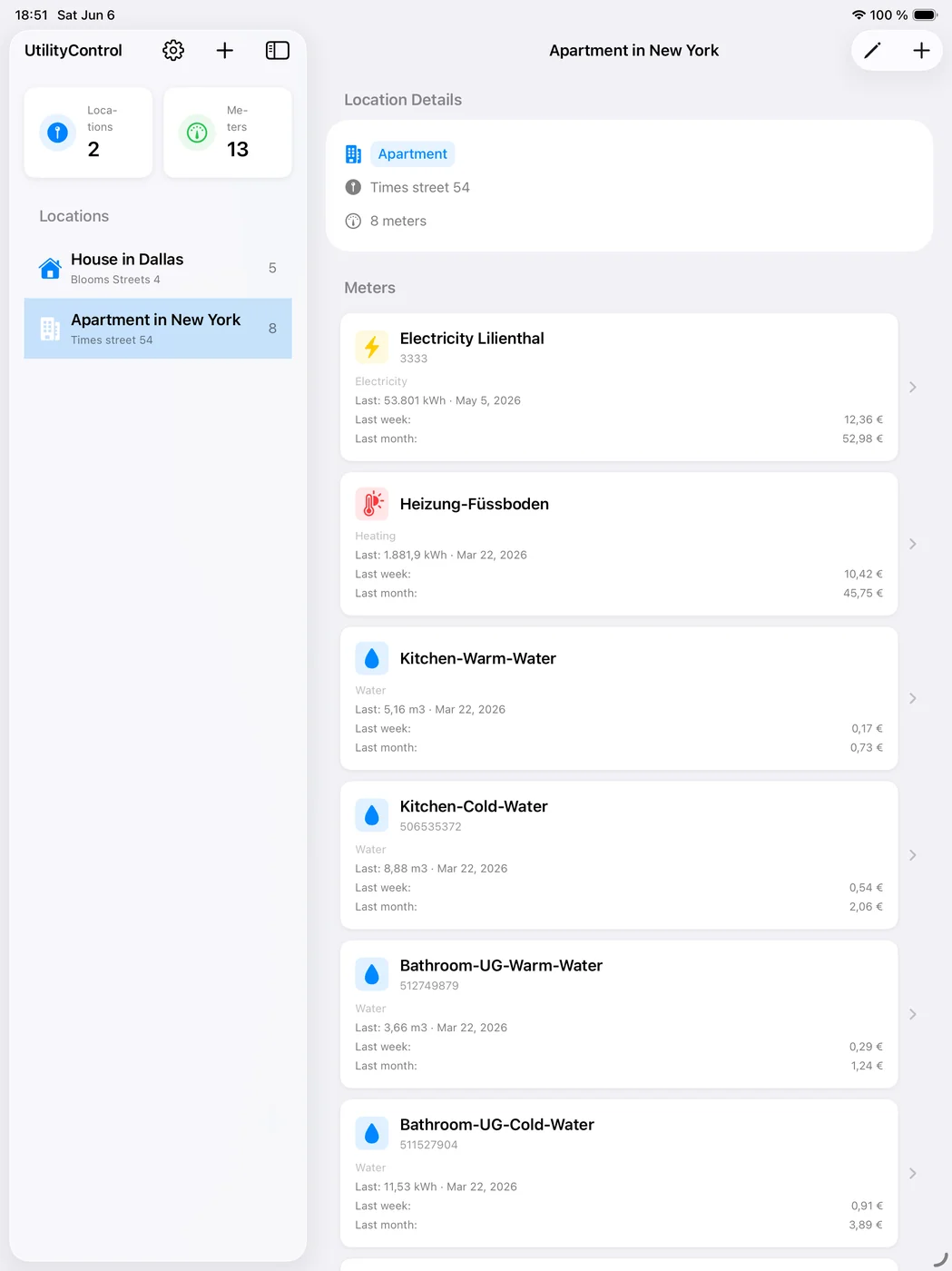
A location can hold as many meters as it needs — here, one apartment is broken down into eight individually named submeters.
Step 3: Standardize meter naming conventions
Naming conventions are where most multi-location systems fail—because names “work” until you try to compare or troubleshoot at scale.
A practical naming convention template
Use a standard that encodes location and purpose:
{PropertyCode}-{Area}-{UtilityType}-{MeterIndex}
Examples:
COL-OTTO-Common-Water-01MUC-SUN-Unit-1203-Electricity-01BER-ALX-Mechanical-Gas-01
Rules that prevent future pain
- One meter = one name across all tools and staff.
- Include utility type explicitly (avoid vague names like “Main”).
- Include area (Unit, Common, Mechanical, Irrigation, etc.).
- Use stable property codes that don’t change with branding.
Step 4: Set up cost tracking and currency management
Multi-location utility cost tracking gets tricky when properties have different tariff structures or currencies. Even if you can’t model every tariff detail, you should capture:
- Cost per unit (for approximate cost forecasting)
- Currency (EUR/USD/GBP, etc.)
- Effective date when cost-per-unit changes (so reporting is interpretable)
UtilityControl supports storing cost per unit and currency per meter, which makes rollups and comparisons easier when you manage mixed portfolios.
Step 5: Implement consistent reading schedules
Consistency matters more than frequency. A weekly schedule that always happens beats a “monthly” schedule that slips.
Recommended cadences
- Weekly: high-risk water meters (leaks), large common-area loads, critical equipment.
- Bi-weekly: typical multifamily properties where staffing is limited.
- Monthly: low-variance meters or small portfolios, especially if bills are the primary artifact.
Operational checklist
- Assign an owner per location (role-based, not person-based).
- Set the reading “anchor day” (e.g., every Monday).
- Document what to do when a reading is missed.
- Validate outliers immediately (don’t wait for month-end).
Step 6: Configure alerts and notifications
Alerts are how you turn tracking into action. Good alerts focus on exceptions, not noise.
High-signal alert types
- Spike alert: usage increases by X% vs baseline (start with 20–30%).
- Continuous usage: water consumption never drops to near-zero in expected idle windows.
- Missing data: no reading logged within the expected schedule.
- Vacant unit anomaly: consumption above expected vacancy baseline.
Even with manual readings, simple alerts (like missing readings and month-over-month spikes) dramatically reduce surprises.
Step 7: Set up reporting and analytics
Reporting is where multi-location tracking pays off. Your goal is to answer: “Which properties are outliers, and what should we do next?”
Core reports to build
- Portfolio rollup: total usage and cost by utility type across all locations.
- Property comparison: cost per unit area (or per unit) across similar properties.
- Trend report: month-over-month usage and cost changes.
- Anomaly log: all alerts with resolution status (open/closed).
UtilityControl’s analytics help you visualize trends and compare locations without maintaining multiple spreadsheets.
Step 8: Train staff and establish workflows
Tools don’t fix inconsistency—workflows do. Your training should focus on:
- How to identify the correct meter (labels + meter numbers).
- How to log readings consistently (date/time and unit checks).
- How to respond to alerts (triage steps, who gets notified).
- How to document exceptions (estimates, access issues, equipment downtime).
Common pitfalls and how to avoid them
- Pitfall: inconsistent meter names → Fix: enforce naming conventions and audits.
- Pitfall: irregular readings → Fix: set a cadence and ownership, track missing readings.
- Pitfall: comparing unlike properties → Fix: normalize comparisons (per unit, per area, or by occupancy).
- Pitfall: too many alerts → Fix: start with a few high-signal alerts, then refine thresholds.
Scaling from 5 to 50+ properties
Scaling is mostly about standardization and automation. As you grow:
- Move from “per property” spreadsheets to location-based systems.
- Use templates (hierarchy, naming, schedule) for new onboarding.
- Introduce role-based responsibilities and monthly portfolio reviews.
- Automate ingestion where possible (CSV import, bill OCR, or integrations).
If you’re ready to implement this workflow with a unified tool, try UtilityControl and start a free trial at /register.
Need multi-location utility tracking without spreadsheet chaos?
UtilityControl helps property managers organize locations, standardize meters, track readings, and spot anomalies across a portfolio—no special hardware required.
Explore UtilityControl Start Free TrialNo credit card required • Start organizing in minutes
Frequently Asked Questions
What is multi-location utility tracking?
Multi-location utility tracking is the process of organizing meters, readings, and bills across multiple properties or sites so you can compare usage, detect anomalies, and report costs consistently. It typically relies on a location hierarchy and standardized naming conventions.
How do I set up a location hierarchy for a property portfolio?
Start with a simple structure such as Portfolio → (Region) → Property → (Sub-location). Keep it minimal, ensure every meter maps to exactly one location, and use stable property codes so reporting stays consistent over time.
How often should property managers read meters?
Weekly readings are best for high-risk meters like water (leaks). Bi-weekly works for many portfolios, and monthly can be sufficient for low-variance sites. Consistency matters more than frequency—choose a cadence you can sustain.
What alerts are most important for multi-site utility monitoring?
Start with spike alerts (20–30% increases), continuous usage (especially water), missing readings, and vacant-unit anomalies. These catch most high-impact issues without creating noisy alert fatigue.
How do naming conventions reduce utility tracking errors?
Standard names prevent duplicate meters, mis-mapped readings, and inconsistent reporting. A template like {PropertyCode}-{Area}-{UtilityType}-{Index} helps staff log readings correctly and makes analytics comparable across sites.
Can UtilityControl track utilities across multiple locations?
Yes. UtilityControl is designed for location-based organization, multi-meter support, cost tracking, and analytics across multiple properties. You can standardize meters, log readings, and review portfolio trends in one place.
What is UtilityControl?
UtilityControl is a comprehensive web-based application designed for monitoring, tracking, and managing utility consumption across multiple locations. It supports electricity, water, gas, and heating meters with intelligent analytics and cost tracking.
Learn more about UtilityControl →
How to Get Started
- Sign up for free at qlines.net - no credit card required
- Add your meters - configure electricity, water, gas, or heating meters with custom names and units
- Start logging readings - enter meter readings manually or import from CSV files
- Analyze your consumption - view interactive charts, track costs, and identify usage patterns
- Use mobile app - download the iOS app for on-the-go meter tracking
Explore More Solutions
QLines offers comprehensive platform solutions beyond utility tracking. Explore all our solutions for device monitoring, remote programming, and centralized management.
Related Posts
Best Utility Tracking Software for Small Landlords (1-5 Units) in 2026
Most utility tracking software is built and priced for 50-unit portfolios. Here's what actually makes sense for landlord...
Read more →Monitoring Energy Use in Commercial Buildings: The Complete 2026 Guide
What does monitoring energy use in commercial buildings actually involve beyond the monthly utility bill? Key metrics, H...
Read more →AI Utility Billing in 2026: What's Actually Changed Since Last Year
"AI utility billing" is mostly marketing gloss over old workflows - but three specific capabilities have genuinely matur...
Read more →